
Get Logic Pro 12 in the Apple App Store
Logic Pro 12 Release Notes
What’s New in Logic Pro 12 (Mac)
Logic Pro 12 isn’t about flashy shortcuts.
It’s about giving Logic harmonic awareness, and letting the entire DAW respond musically to what you’ve already played. This update quietly changes how songs get built.
Chord ID: Logic Finally Understands Your Music
Logic Pro 12 introduces Chord ID, a new system that analyzes harmony directly from your audio or MIDI.
You can now:
- Drag an audio or MIDI region to the Chord Track
- Have Logic analyze and extract the chord progression automatically
- Apply those chords across your project
- Edit or refine results manually at any time
This works with:
- MIDI regions
- Audio recordings
- Imported files
- Even Voice Memos recordings
Logic analyzes both chord quality and harmonic rhythm, meaning it understands when chords change, not just what they are. Your DAW is now effectively a live lead sheet.
Harmonic Intelligence Across the Entire Project
Chord ID doesn’t live in isolation.
Once chords exist in the Chord Track, Logic can:
- Drive Session Players harmonically
- Control Step Sequencer pitch behavior
- Let regions inherit or override harmonic data
- Allow chord progressions to be copied, pasted, and rearranged like regions
You’re no longer locked into static loops or guessing keys. Harmony becomes an editable structure.
New Synth Session Players (Keyboard + Bass)
Logic Pro 12 expands Session Players with synth-based performance styles that respond to the Chord Track.
Keyboard Synth Player styles:
- Simple Pad
- Modulated Pad
- Rhythmic Chords
Bass Synth Player styles:
- Pump Bass
- 808 Bass
- Sequenced Bass
These aren’t genre presets. They’re harmonically reactive instruments that adapt instantly to chord changes, letting you sketch arrangements in minutes instead of hours. And yes, you can swap in your own instruments and effects chains.
Step Sequencer Now Follows Harmony
The Step Sequencer gets a major upgrade in Logic Pro 12.
You can now assign rows to:
- Fixed pitches
- Key signature and mode
- Region chords
- Chord Track harmony
Additional improvements include:
- Per-pattern and per-row randomization
- Expanded playback modes
- New pattern lengths (including 5/4 and 7/8)
- Reorganized inspectors for faster editing
This turns the Step Sequencer into a musically aware generator, not just a rhythmic tool.
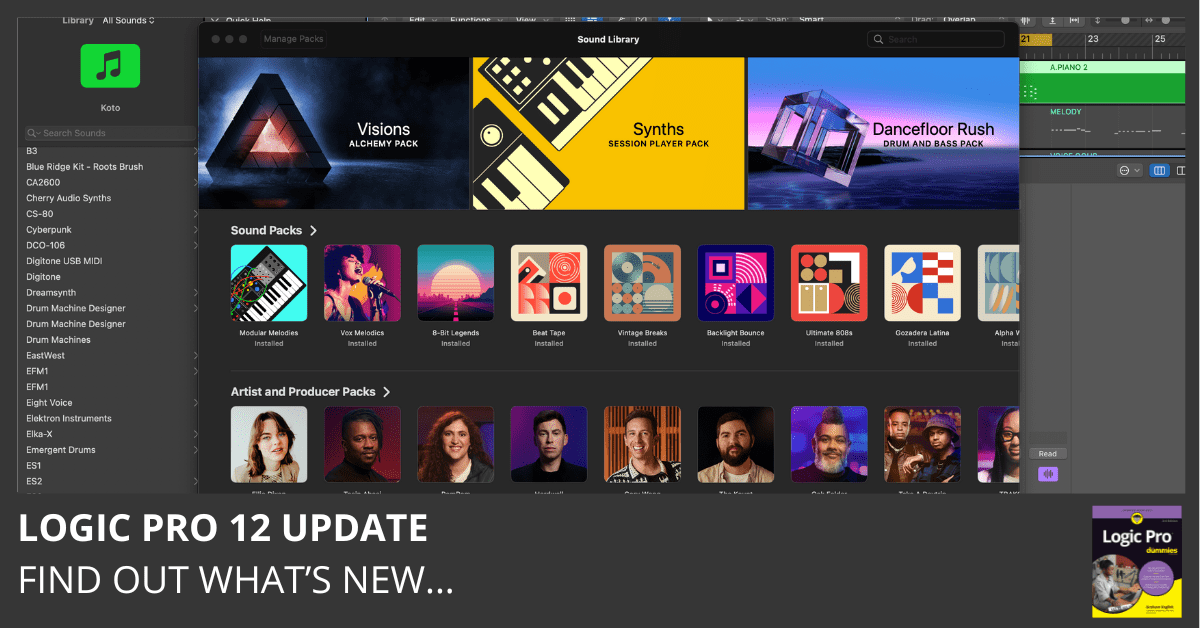
Redesigned Sound Library System
The Sound Library has been completely rebuilt.
New in Logic Pro 12:
- Visual, color-based library interface
- All sound content is stored in a single movable package
- Support for local, external, or network drives
- Shared access across multiple user accounts
Managing large sound libraries is finally painless, especially in studios or multi-user environments.
New Sound Packs
Logic Pro 12 includes new downloadable content:
- Visions — Alchemy synth textures
- Synth Session Players — content designed specifically for harmonic-aware playback
These packs are pre-analyzed for Chord ID, meaning the harmonic data is already embedded when you load them.
Spatial Audio Playback for QuickTime Audio
Logic Pro 12 adds support for QuickTime Audio (QTA) files, including recordings from iPhone 16 Pro devices.
You can:
- Import QTA files directly
- Choose mono or stereo playback
- Isolate voices
- Remove ambience
- Edit Spatial Audio parameters in the Region Inspector
This feature supports immersive workflows for Spatial Audio and Dolby Atmos projects on supported Macs.
Quantec Room Simulator (Surround)
The Quantec Room Simulator now supports:
- Surround formats up to 7.1.4
- Immersive reverb workflows for Dolby Atmos bed tracks
- Detailed control over surround channel pairs
This brings a serious high-end spatial reverb option directly into Logic Pro’s native plug-in set.
Additional Workflow Improvements
- Folder stacks can now convert directly to summing stacks
- Flashback Capture added to the default Control Bar layout
- Advanced Features are now always enabled (no Advanced pane)
- Cleaner, more consistent project behavior across sessions
Logic Pro 12 reduces setup friction, especially for newer users, while still keeping deep control available.
Why Logic Pro 12 Matters
This isn’t about AI replacing creativity.
It’s about Logic understanding music theory well enough to support creative decisions, without forcing prompts, cloud tools, or generative audio.
Everything happens locally.
Everything stays editable.
Everything remains musical.
Logic Pro 12 doesn’t write songs for you.
It finally listens.
Read Past Logic Pro Update Highlights
- Logic Pro 11.2 Update
- Logic Pro 11.1.2 Update
- Logic Pro 11.1.1 Update
- Logic Pro 11.1 Update
- Logic Pro 11.0.1 Update
- Logic Pro 11 Update
- Logic Pro 10.8.1 Update
Your Logic Pro Coach,
Graham
Free Download
Get the Free Logic Pro Quick Start Guide
The key workflows, settings, and shortcuts to get up and running in Logic Pro fast. Enter your name and email and I'll send it right over.
Your information stays private. No spam, no sharing, ever.