
If you're stuck trying to get Logic Pro to recognize your Blue Snowball USB microphone, there's a simple solution.
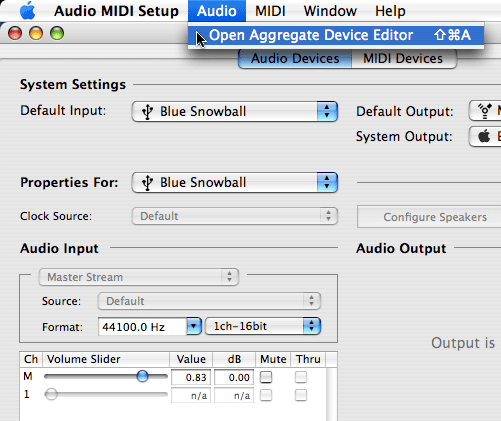
Open Audio MIDI setup in your Applications/Utilities folder and from the Audio menu, select Open Aggregate Device Editor. In OS X 10.7 (Lion), click the + at the bottom of the Audio Devices window and choose Create Aggregate Device.
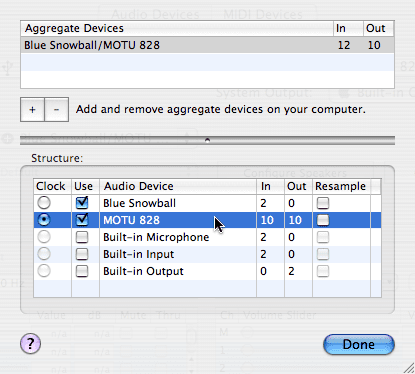
Click on the "+" to add an aggregate device. Select your Blue Snowball mic as the input and your regular soundcard as the output. If you use your Snowball away from your regular soundcard, like when you're on the road, you may also want to create another aggregate device with your output set to the "Built-In Output" and input set to your Snowball. You might want to rename your aggregate devices to something that's easily recognizable. Click Done and close the Audio MIDI Setup.
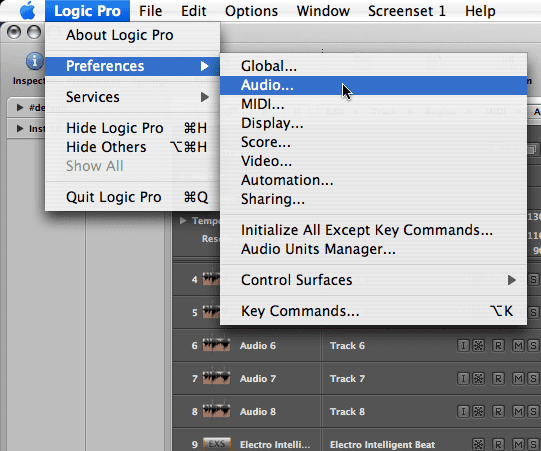
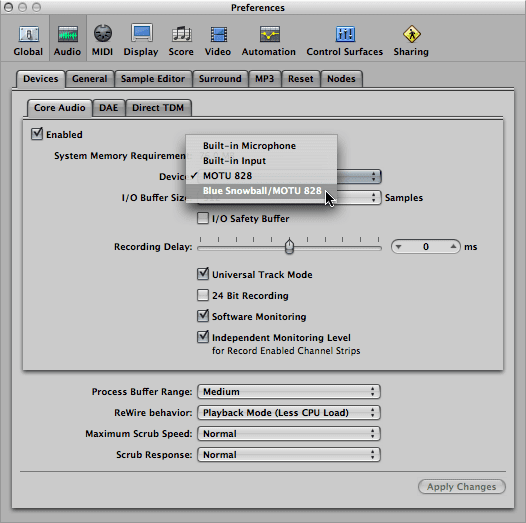
In Logic Pro, open the Audio Preferences menu: Logic Pro > Preferences > Audio.
Your aggregate device is now an available device in the Core Audio menu of your Audio Devices. Select it and relaunch. Inputs 1-2 will give you input from your Snowball mic.
Free Download
Get the Free Recording Cheat Sheet for Logic Pro
The recording essentials in one quick reference: levels, monitoring, clean MIDI capture, and the takes-and-comping workflow. Enter your name and email and I'll send it right over.
Your information stays private. No spam, no sharing, ever.
This works…made my morning! I thought a session for this morning was ruined…
Didn’t work for me. Followed all the steps; the snowball still doesn’t appear in my audio devices.
Did you rename the aggregate device that you created to something memorable that you would notice? Also, did you restart Logic or your computer?
it never workd for me too
i rebooted logic aswell and it doesnt give the aggregate device option
Were you able to create the aggregate device? Is it just not showing up in Logic? Or were you not able to create it.
If it’s the latter, make sure you have the “Audio Devices” tab of your Audio MIDI Setup window selected. If it’s the former, and your aggregate device does show up in the aggregate device editor but you can’t get Logic to recognize it, then I would have to guess it might be a corrupted preference file.
If you really want to troubleshoot this, try capturing video of your screen as you go through the steps to recreate the problem. Upload it to YouTube and we can all help.
Here’s what I had to do to get this to work:
I’m fortunate to have corporate volume licenses of both Logic Express and Logic Pro. I tried everything that was stated in this post to get Logic Pro to recognize an aggregate device but it wouldn’t even register under devices. I decided to give it a shot in Logic Express and it worked fine there so I went back to Pro to see if anything had changed. It wasn’t until I had opened it with Express that Pro recognized it. Not sure why that’s the case but that’s what worked for me.
Good to know. Thanks, Alex! It must be an idiosyncrasy of some kind, maybe with your computer or with users who have both Logic Express and Logic Pro installed on the same machine. Who knows.
I had this problem in OS 10.5x and lower with Logic Pro 8. The thing is, sometime it would work, other times wouldn’t show up. With all the problems I was having in Logic 9 and OS 10.6x, the blue snowball was not one of them -worked flawless.
Hi – The Blue Snowball requires Output Device selection in the Aggregate Device option (as well as an input). To get this to work, be sure to select an Output.
So now I have a new problem. The microphone is reading in Logic XPress 8 – but has a 1 second (or so) delay on output. Does anyone know how to solve this?
Check your audio prefs in Logic. Maybe the Recording Delay is the culprit.
Snow ball melting not working after following these steps
JG
I’ll need more info to help. Have you restarted your computer and Logic? Have you checked your Audio MIDI Setup with the Snowball plugged in to see that it’s working at all?
In my Logic preferences, after setting up aggregate device as Snowball. snowball is not coming up as a device to choose from.
Joseph
When you open Audio MIDI Setup, do you see it as an available input? Maddie said above that you have to select the Output Device option in the Aggregate Device Editor as well.
I figured out what the problem was, I bought a crappy usb microphone. To fix it, I went to the store and bought a non-usb/non-crappy microphone and plugged it in. THE END.
Using Logic 8.0.2, Leopard 10.5.8 on a MacBook Pro. The above is the correct way to get the Snowball going with Logic. The only change I would make is that when creating the aggregate device, and you wish to use the built in output to monitor, select the Snowball as the clock source and this will eliminate the latency. If you have the built in output as “clock”, you hear roughly a full second of latency when using software monitoring in Logic 8.
Hope this helps. Love the mic. I also got it working fine with Garage Band.
Thanks Graham, I followed your instructions and thought that it didn’t work but after an inordinate amount of time a window appeared in Logic Pro saying that it was scanning for a new aggregate device and asked if I wanted to use the aggregate device. After clicking on the yes I closed Logic and restarted the computer and now Blue Snowball is recognized in Logic and Built-in Audio is used as the output. I would suggest that a person allows up to 5 mins for Logic to scan for the device before giving up. I’m using a Power Mac G5 Quad 2.5 and it took nearly that long. Peace, t
ALSO make sure that in the properties for … area for your aggregate device you have output audio channels 1 and 2 linked to your speakers. I kept clicking my USB mic before my built-in device, causing the audio channels 1 and 2 to be linked to a theoretical stereo output in my mic (who’da thought?)
Creating an aggregate in Snow Leopard audo/midi control panel: click on the plus button on the bottom left of the panel. For me, it adds an aggregate device named “Aggregate Device”. In the right dialog box click “build-in Input”, Built-in Output, and Blue Ball USB mic rev 1″. Click the default name to some you like perhaps BlueBallAggregate” and close the Audio/Midi control panel. Open Logic Pro 8. Go to Preferences/Audio. Click the drop down list labeled “Device” and select the newly created “BlueBallAggregate”. Create a audio track, activate record, press record and create sound via your Blue Ball and you should see audio being recorded. Thanks to the observer who noted that an output had to be added to the aggregate. Which makes sense in a non-intuitive way. Blue is to be heavily faulted for not providing this on the FAQ on their web site.
ok.. so im having a problem thats similar.. i have a cad u37 usb condenser mic and have been trying for 2 days straight to get it to work with my logic express i follow all these instructions. but on thing when im making the aggregate device i dont see in or out i just see the mic and default audio device. :/
i can get my mic to record and i can see the waves and everything but.. no sound at all.. 🙁
can someone please help me..
thanks, Cody
Make sure you use your aggregate device as the sound input and output in Logic’s preferences.
this is not working in my snow leopard it actually doesnt create a device when i push the plus key. im trying it on amacbook pro and an imac
That’s definitely strange. Have you searched the Apple discussion boards for anyone having a similar problem? I’m on Snow Leopard and I can create as many aggregate devices as I want by clicking the plus button. Try repairing permissions, performing maintenance, etc.
Hi,
This worked for me and my snowball. But now when I select the snowball and the built in out put together it only allows one to work. If i select the snowball 1st during the creation of an aggregate device it shows as 2 inputs, but the output stays 0. If i select them the other way round then the input stays at 0 when I select the snowball. Any idea how to fix this?
Not sure what OS you’re using but there’s a “Use” checkbox by each audio device in the Audio Midi Setup. Double-check that.
The solution to my problem with getting this to work was to delete my audio files from the library folder and my audio playlist file from there as well. Hope that makes sense.
Hei thanks graham that worked for me too i fixed the snow ball back to hits thanks again for the good work!
Great! It works! Now I have a problem with millisecond delay. Thanks!
thanks for this tip!
i’m using the snow leopard version of Audio MIDI setup
you have to click on the + button to create an Aggregate Device
it worked well
Hi! I have a Mac OS X 10.6.3
My first problem is that I can’t follow your steps because my Audio MIDI Setup window is different to your`s. I uploaded an image to show you here http://www.megaupload.com/?d=W1S8IMQT . Hope you can help me, thank you from Argentina!
Hey folks out there, i had a simple problem with getting mine to work. Just because the red light is on doesnt mean that its on and the computer can recognize it. Simple fix —- for some reason blue decided to make it to where the USB cable could plug into the mic and show the red light even if its in upside down, just flip it around and see if it then shows up in your midi/audio settings. Worked for me so im happy, thought i would have to return it!