
Get Logic Pro 13 in the Apple App Store
Logic Pro 13 Release Notes
What's New in Logic Pro 13 (Mac)
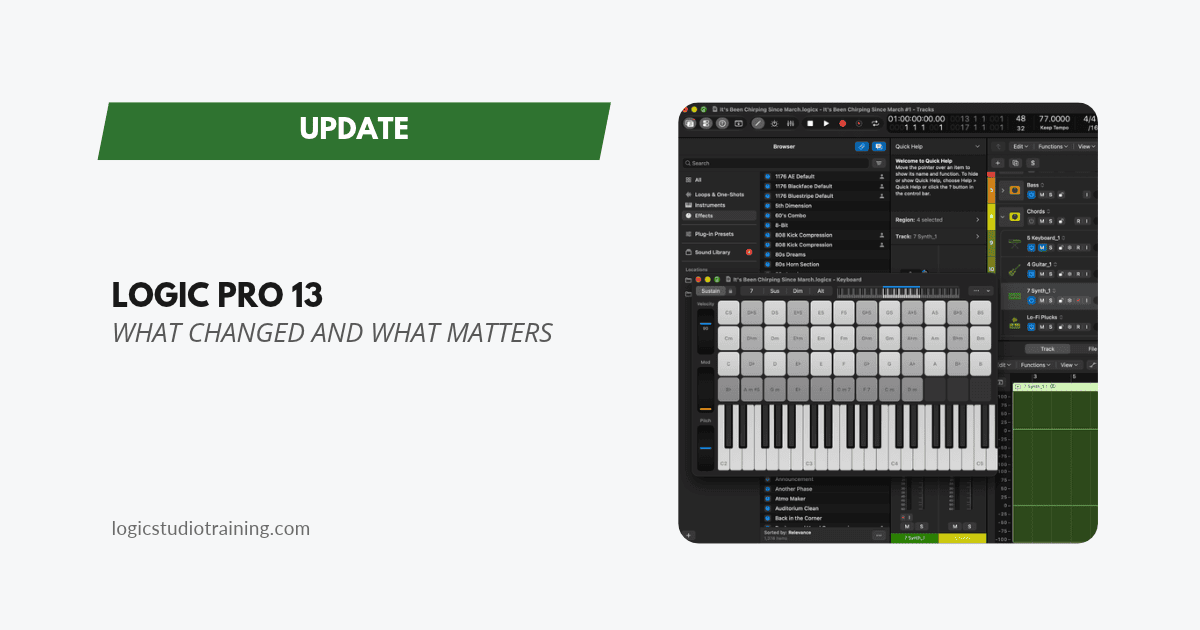
Logic Pro 13 is out, and it's the update Apple previewed on October 27. The change you'll feel first is the new Browser, which puts the Logic Pro Sound Library, your samples, your patches, and your plug-in presets behind one search field. If you read what's coming in Logic Pro's November update, this post covers what shipped, including a couple of pleasant surprises.
Logic Pro 13 runs on a Mac with Apple silicon and macOS 26.1 or later. If you bought Logic outright, everything in this post except the Assistant is yours, because Apple's notes tie only the Assistant to an Apple Creator Studio subscription.
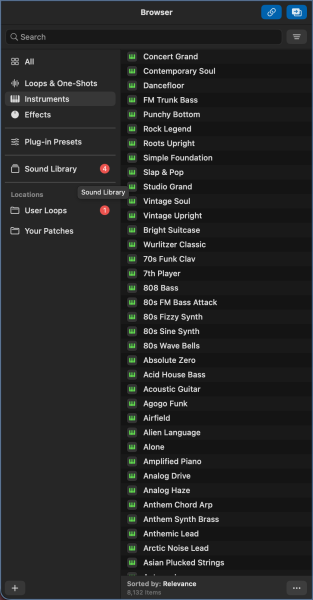
The New Browser
Logic Pro 13 brings all your sounds into one Browser. Press B to open or close it, or Command-F to open it with the search field ready. Smart Controls moved to the Y key to make room.
You can describe a sound in your own words to find loops, one-shots, and patches, then save that search as a Smart Search. Filter tags, favorites, and sorting by tempo, key, or date added are all there too.
Two buttons change how the Browser behaves. Link makes it follow the selected track and show related sounds first, and Replace loads a patch onto the track as soon as you select it.
If you kept loops in User Loops or Untagged Loops folders in earlier versions, you can import those folders as Locations.
Find Similar and Sound Analysis
Logic now analyzes the audio in your Locations and tags loops and one-shots with tempo, key, and filter tags. You can edit any tag Logic adds.
Select a loop or one-shot and choose Find Similar, or drag a sample into the search field, and Logic shows sounds that resemble it across your collection. Point it at the messiest sample folder you own and see what it digs up.
Describing sounds in your own words, Find Similar, Link and Replace, and the analysis of your own audio all need a Mac with Apple silicon.
Splice in the Browser
If you have the Splice app installed and you've downloaded sounds, Splice Sounds appears in the Browser's Locations and stays in sync with the Splice app. Logic analyzes those sounds too, so they turn up in descriptive searches and Find Similar results. Splice pack names don't show in the Browser, and pack filter tags apply only to Logic's own Sound Library.
Play Surface
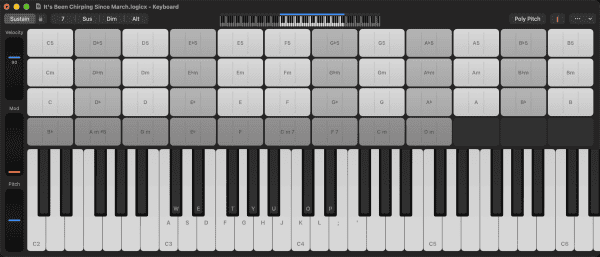
Play Surface is the surprise of this release, and it works on every Mac. Choose Window > Show Play Surface (Command-K) to get an on-screen keyboard with Chord Strips, or a grid of drum pads, matched to the selected track's patch. You can play it with your computer keyboard, mouse, or trackpad, and open up to four at once.
The keyboard surface has side controls for velocity range, modulation, and pitch bend. Poly Pitch lets you glide between notes and is MPE-compatible, and a Y-axis option turns dragging on a key into modulation, pressure, or velocity.
Chord Strips play a chord when you click and strum when you drag. You can build them from the Chord Track or the project key, add a bass note, change inversions, and switch between circle-of-fifths and chromatic layouts.
The drum pads have velocity and gate controls plus a Rate slider for note repeats from 1/32 to 1/4. There's also an arpeggiator with a Record MIDI to Track option, and the Musical Typing window is still available if you prefer it.
For songwriters without a controller nearby, this is the feature to try first. Load a piano, open Chord Strips, and you can sketch a progression from the couch.
Touch on the New MacBook Pro and Sidecar
On the MacBook Pro with PROLED XDR Display, or an iPad connected through Sidecar, every Play Surface supports Multi-Touch. Touch works across the rest of Logic too: one-finger scrolling, touch-and-hold to drag or open a context menu, and Multi-Touch on mixer faders and knobs, Step Sequencer steps, Channel EQ bands, Vintage B3 drawbars, Remix FX, and Smart Controls.
You can tap Live Loops cells to launch them and swipe across Browser icons to preview sounds. With Sidecar, plug-in windows can move to the iPad and resize to fit, and Apple Pencil works on the Play Surface.
Sidecar support turns an iPad you already own into a touch controller for Logic on your Mac.
Stem Splitter Drum Separation
Stem Splitter can now pull a drum part apart. The new Drums (Individual Kit Pieces) preset extracts kick, snare, hi-hat, toms, cymbals, and other percussion, and groups those stems in a summing Track Stack. You can extract them with the other stems or on their own, and stems now account for the original region's gain.
If you haven't tried Logic Pro's Stem Splitter yet, start with an old demo bounce that has a boomy kick. Split the kit, pull the kick down, and listen to the rest of the mix open up.
Assistant (Beta)
Logic Pro 13 includes an Assistant in beta that takes requests in plain English. Apple's examples include creating an acoustic guitar track, adding a compressor to a vocal, converting a Drummer region to MIDI, telling the bass Session Player to follow the drums, and answering questions like how to mic an acoustic guitar. Open it from the control bar or the View menu.
The Assistant has the strictest requirements in this release. It needs an Apple Creator Studio subscription, a Mac with Apple silicon running macOS 27 or later, and an Apple Account signed in to iCloud. It works in English only, and Apple says usage limits may apply.
Apple says it keeps your projects and prompts out of model training. Conversations stay with the project on your Mac and stay behind when you share or move the project.
If you subscribe, treat it as a helper for when you're stuck, and keep your core workflow running on the skills you already have, since beta features change between releases. If you're weighing the subscription for this one feature, here's how Apple Creator Studio fits a musician's setup.
Liquid Glass Design
Windows, the toolbar, and local menus get the new Liquid Glass look, and Apple redesigned the transport display and buttons. Screenshots in older tutorials (mine included) will look different from your screen until I refresh them.
More New Features
- The Sergio George Producer Pack and a new Drill Yard pack are available to download from the Sound Library.
- Audio Quick Look lets you press and hold a project file to hear a preview.
- The Step Sequencer supports multi-select, so you can edit several steps and rows at once, randomize from the context menu, and draw ramps with Command-Option-drag.
- A single inspector now shows region, track, and other parameters in one place, and the Region inspector adds position and length.
- You can unlink the Mixer's Track Stack view from the Tracks area so each one shows or hides subtracks on its own.
- You can export selected tracks as a MainStage patch or set.
- Save Undo History is on by default, so projects keep their undo history after you save and reopen them.
- Studio Voice is now called Studio Sound, matching Apple's other apps.
- VoiceOver support expands to the Browser, the toolbar, and the Chord Track.
Crash Fixes
- Logic Pro no longer hangs when you save a project with Save As.
- Fixes crashes when editing notes in the Piano Roll, resizing audio regions, switching projects with an editor open, and undoing after Smart Tempo analysis.
- Fixes a crash caused by a Plug-in Manager category sharing its name with a plug-in.
Recording and Takes
- With Merge Current Recording Only turned on, stopping within the first two beats of a new cycle pass now keeps the previous pass's recording.
- Recorded MIDI regions now use the Q-Swing and Q-Strength values from your MIDI region defaults.
- A frozen track with a MIDI take folder stops playing when you turn it off.
Editing
- Canceling Normalize in the Audio File Editor no longer leaves one audio channel silent.
- Trimming the left edge of a region keeps it in place.
- Flexed audio regions keep their positions when you convert a project to a new sample rate.
Mixer
- The input menu on audio channel strips lists mono and stereo inputs and sets the channel format to match.
- A new Remove Bypassed Sends command clears unused sends from selected channel strips.
- The -4.5 dB and -4.5 dB Compensated pan law settings now use the correct values.
Plug-ins
- Vienna Ensemble Pro reconnects to Vienna Ensemble Pro Server over the network again.
- Beat Breaker no longer clicks at the cycle loop point.
Performance and General
- Clean Up Project no longer tries to delete audio files the project still uses, and it now removes unused audio file references.
- Importing a MIDI file into an existing project brings in its key signature.
- Smart Tempo detects more offbeat loops and loops with sound before the first beat.
- Command-Period stops the whole export when you export multiple regions as audio files.
Should You Update?
Yes, after you back up the Logic Pro app and your projects. The Clean Up Project fix alone earns the update, since earlier versions could try to delete audio files a project still used.
Update between projects. The new Browser changes a step you take every session, so give yourself a low-stakes hour to learn it before you open anything with a deadline.
Read Past Logic Pro Update Highlights
- Logic Pro 12.4 Update
- Logic Pro 12.3.1 Update
- Logic Pro 12.3 Update
- Logic Pro 12.2 Update
- Logic Pro 12 Update
- Logic Pro 11.2 Update
Your Logic Pro Coach,
Graham
Free Download
Get the Free Logic Pro Quick Start Guide
The key workflows, settings, and shortcuts to get up and running in Logic Pro fast. Enter your name and email and I'll send it right over.
Your information stays private. No spam, no sharing, ever.