
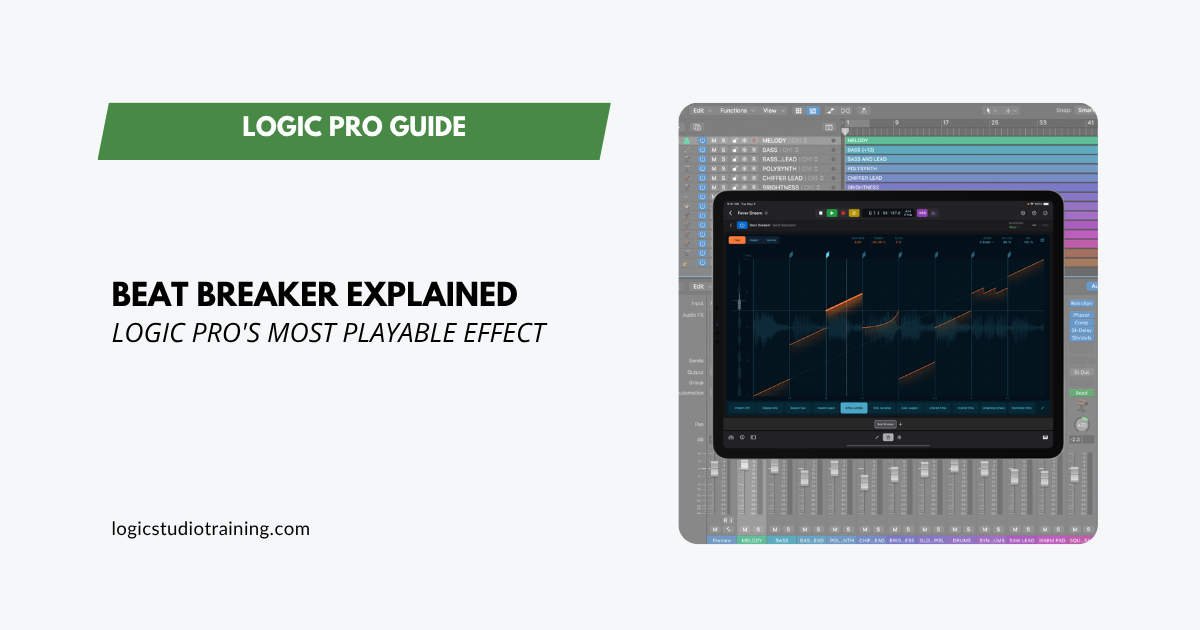
If your beats are starting to feel predictable, Logic Pro has a plug-in designed to shake things up.
It’s called Beat Breaker, and it's a performance instrument as much as an effect. It reshapes audio in real time, slicing, rearranging, and transforming sound as you play.
Producers in EDM, hip-hop, and experimental genres are already leaning on it to generate stutters, reverses, and unexpected grooves. Even if you're sketching song ideas, Beat Breaker can pull you out of writer's block in seconds. It's also one of the fastest ways to add ear candy to a track that needs detail.
What Beat Breaker Actually Does
Beat Breaker listens to incoming audio and chops it into slices. Each slice can be reordered, repeated, reversed, or reshaped for dynamics. The performance aspect is where it shines: you can switch between patterns instantly, which makes it playable rather than static.
Say you've got a drum loop that feels flat. Drop Beat Breaker on it, and you're flipping kicks backward, repeating snares eight times in a row, and pulling the hi-hats into chopped rhythmic fills. Instead of programming all that by hand, Beat Breaker handles it in real time.
The Main Editor, Broken Down
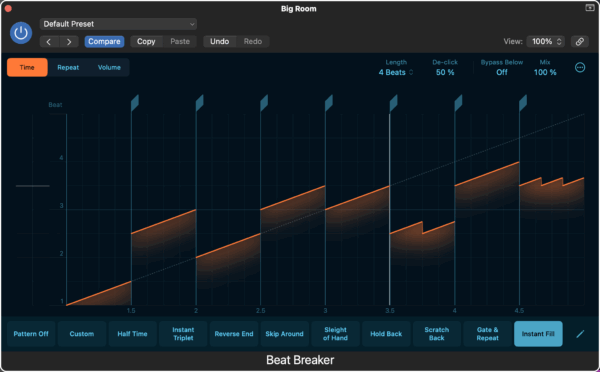
When you open Beat Breaker, you'll see three main sections:
- Upper Section
- Pick an edit mode: Time (orange), Repeat (magenta), or Volume (yellow).
- Adjust global controls like Length, De-click, Mix, and Bypass Below.
- Middle Section
- This is where the waveform lives. Add, move, or delete slices in the Slice Editor strip above the audio.
- Up to 32 slices per pattern.
- Lower Section
- Pattern buttons let you switch variations instantly.
- The Pattern Slot menu helps you save, rename, copy, and organize your work.
The Three Edit Modes You’ll Use Most
1. Time Mode (Orange)
- Adjust the Input Beat to change which part of the source audio plays.
- Change the Speed to stretch, shrink, or reverse playback.
- Use the Curve for gradual tempo ramps inside a slice.
Example: Flip a vocal chop backward while gradually speeding it up to create a riser.
2. Repeat Mode (Magenta)
- Add up to 8 repetitions per slice.
- Perfect for glitch, stutter, or trap hi-hat effects.
Example: Turn one snare into a machine-gun fill at the end of a bar.
3. Volume Mode (Yellow)
- Control volume swells and fades for each slice.
- Slope sets the rise/fall across the slice.
- Curve shapes how that fade happens.
Example: Fade a kick drum slice out while layering a reverse cymbal underneath for a dynamic build. That kind of build is a core arrangement move, and Beat Breaker gets you there without drawing automation by hand.
Building Patterns That Perform
A single pattern is powerful, and switching between them is where it gets interesting. You can store multiple patterns in slots, name them, and move between them with a click.
- Reset a slot with Recall Default
- Build a variation in Time mode
- Add stutter fills in Repeat mode
- Adjust the balance with Mix for subtlety or 100% wet for full-on chaos
During a live set, you could build four variations of a loop and jump between them without missing a beat.
Worth trying: run Beat Breaker on a bus at 100% wet and send your drums to it. You keep the dry loop intact and blend the chopped version underneath, which gives you glitch texture without committing the whole part to it.
Step-by-Step Workflow
Add Beat Breaker to a Track
- In the channel strip, select an Audio FX slot.
- Choose Multi Effects > Beat Breaker.
- The Main Editor opens.
Create Your First Pattern
- Enter Pattern Slot Edit mode.
- Select a Pattern slot and hit Recall Default.
- Choose Time mode and move a slice to a new position.
- Add a Repeat slice for a stutter.
- Adjust the Mix knob until it blends with the original audio.
Manage Slices
- Add a slice by clicking the strip above the waveform.
- Move it left or right to align with beats.
- Double-click to delete.
Save and Organize Patterns
- Save patterns in the User folder.
- Use Save As to create variations.
- Rename them clearly (e.g., “Snare Glitch Fill” or “Reverse Vox Riser”).
Why Producers Love It
Beat Breaker's strength is how fast it changes the feel of your track. Instead of automating multiple plug-ins or manually editing waveforms, you can reshape loops in seconds. That speed is an advantage when you're chasing inspiration.
Even a simple four-on-the-floor loop can morph into something unrecognizable: chopped, stuttered, reversed, and ready for the drop.
Key Takeaways
- Beat Breaker slices audio in real time and lets you reorder it
- Three edit modes give you control over time, repetition, and volume
- You can save and recall patterns instantly for live or studio use
- Global parameters like Mix, De-click, and Bypass Below keep the effect polished
- It’s one of the fastest ways to break creative ruts and discover fresh ideas
Get More From the Plugins You Already Own
Beat Breaker is one of dozens of Logic plugins that sit unopened in most producers' sessions. The more of Logic you know, the less you reach for something you'd have to buy.
That's what Logic Pro For Dummies covers: a plain-English walkthrough of recording, editing, mixing, and producing in Logic, including the tools most people never find on their own.
Try It in Your Next Session
Open a project, drop Beat Breaker on a loop you've heard too many times, and start slicing. Within minutes, you'll find grooves you didn't know were hiding in your track.
Your Logic Pro Coach,
Graham
Logic Pro For Dummies
The Complete Plain-English Guide to Logic Pro
Written by Graham English — the most accessible and complete Logic Pro reference available. Stop Googling every question and actually understand how Logic works.
See the Book →