Mixing
From Logic Studio Training Wiki
Jump to navigationJump to searchTo open the Logic Pro X mixer:
- Choose View > Show Mixer or press X
- Choose Window > Mixer to open in a new window or press Command-2
{{#ifeq:|yes||
{{#if:|}}{{#if:|}}}}{{#ifeq:|yes|{{#if:|{{{title}}}}}}}{{#if:|{{#if:
||{{#if:
|{{#if:
|
}}
}} }}{{#if:|{{#if:
||{{#if:{{{subheader2}}}
|{{#if:
|
}}
}} }}{{#if:|{{#if:
||{{#if:{{{image1}}} {{#if:|
{{{caption1}}}}}
|{{#if:
|
}}
}} }}{{#if:|{{#if:
||{{#if:{{{image2}}}{{#if:|
{{{caption2}}}}}
|{{#if:
|
}}
}} }}{{#if:The Complete Logic Pro
||{{#if:
|{{#if:
|
}}
}}{{#if:
||{{#if:Logic Pro - The Big Picture
|{{#if:
|
}}
}}{{#if:
||{{#if:Logic Pro Quick Start
|{{#if:
|
}}
}}{{#if:
||{{#if:The Arrange Window
|{{#if:
|
}}
}}{{#if:
||{{#if:Tracks and Channel Strips
|{{#if:
|
}}
}}{{#if:
||{{#if:Recording Audio
|{{#if:
|
}}
}}{{#if:
||{{#if:Recording MIDI
|{{#if:
|
}}
}}{{#if:
||{{#if:Editing Audio
|{{#if:
|
}}
}}{{#if:
||{{#if:Editing MIDI
|{{#if:
|
}}
}}{{#if:
||{{#if:Mixing
|{{#if:
|
}}
}}{{#if:
||{{#if:Automating the Mix
|{{#if:
|
}}
}}{{#if:
||{{#if:Bouncing Your Project
|{{#if:
|
}}
}}{{#if:
||{{#if:
|{{#if:
|
}}
}}{{#if:
||{{#if:
|{{#if:
|
}}
}}{{#if:
||{{#if:
|{{#if:
|
}}
}}{{#if:
||{{#if:
|{{#if:
|
}}
}}{{#if:
||{{#if:
|{{#if:
|
}}
}}{{#if:
||{{#if:
|{{#if:
|
}}
}}{{#if:
||{{#if:
|{{#if:
|
}}
}}{{#if:
||{{#if:
|{{#if:
|
}}
}}{{#if:
||{{#if:
|{{#if:
|
}}
}}{{#if:
||{{#if:
|{{#if:
|
}}
}}{{#if:
||{{#if:
|{{#if:
|
}}
}}{{#if:
||{{#if:
|{{#if:
|
}}
}}{{#if:
||{{#if:
|{{#if:
|
}}
}}{{#if:
||{{#if:
|{{#if:
|
}}
}}{{#if:
||{{#if:
|{{#if:
|
}}
}}{{#if:
||{{#if:
|{{#if:
|
}}
}}{{#if:
||{{#if:
|{{#if:
|
}}
}}{{#if:
||{{#if:
|{{#if:
|
}}
}}{{#if:
||{{#if:
|{{#if:
|
}}
}}{{#if:
||{{#if:
|{{#if:
|
}}
}}{{#if:
||{{#if:
|{{#if:
|
}}
}}{{#if:
||{{#if:
|{{#if:
|
}}
}}{{#if:
||{{#if:
|{{#if:
|
}}
}}{{#if:
||{{#if:
|{{#if:
|
}}
}}{{#if:
||{{#if:
|{{#if:
|
}}
}}{{#if:
||{{#if:
|{{#if:
|
}}
}}{{#if:
||{{#if:
|{{#if:
|
}}
}}{{#if:
||{{#if:
|{{#if:
|
}}
}}{{#if:
||{{#if:
|{{#if:
|
}}
}}{{#if:
||{{#if:
|{{#if:
|
}}
}}{{#if:
||{{#if:
|{{#if:
|
}}
}}{{#if:
||{{#if:
|{{#if:
|
}}
}}{{#if:
||{{#if:
|{{#if:
|
}}
}}{{#if:
||{{#if:
|{{#if:
|
}}
}}{{#if:
||{{#if:
|{{#if:
|
}}
}}{{#if:
||{{#if:
|{{#if:
|
}}
}}{{#if:
||{{#if:
|{{#if:
|
}}
}}{{#if:
||{{#if:
|{{#if:
|
}}
}}{{#if:
||{{#if:
|{{#if:
|
}}
}}{{#if:
||{{#if:
|{{#if:
|
}}
}}{{#if:
||{{#if:
|{{#if:
|
}}
}}{{#if:
||{{#if:
|{{#if:
|
}}
}}{{#if:
||{{#if:
|{{#if:
|
}}
}}{{#if:
||{{#if:
|{{#if:
|
}}
}}{{#if:
||{{#if:
|{{#if:
|
}}
}}{{#if:
||{{#if:
|{{#if:
|
}}
}}{{#if:
||{{#if:
|{{#if:
|
}}
}}{{#if:
||{{#if:
|{{#if:
|
}}
}}{{#if:
||{{#if:
|{{#if:
|
}}
}}{{#if:
||{{#if:
|{{#if:
|
}}
}}{{#if:
||{{#if:
|{{#if:
|
}}
}}{{#if:
||{{#if:
|{{#if:
|
}}
}}{{#if:
||{{#if:
|{{#if:
|
}}
}}{{#if:
||{{#if:
|{{#if:
|
}}
}}{{#if:
||{{#if:
|{{#if:
|
}}
}}{{#if:
||{{#if:
|{{#if:
|
}}
}}{{#if:
||{{#if:
|{{#if:
|
}}
}}{{#if:
||{{#if:
|{{#if:
|
}}
}}{{#if:
||{{#if:
|{{#if:
|
}}
}}{{#if:
||{{#if:
|{{#if:
|
}}
}}{{#if:
||{{#if:
|{{#if:
|
}}
}}{{#if:
||{{#if:
|{{#if:
|
}}
}}{{#if:
||{{#if:
|{{#if:
|
}}
}}{{#if:
||{{#if:
|{{#if:
|
}}
}}{{#if:
||{{#if:
|{{#if:
|
}}
}}{{#if:
||{{#if:
|{{#if:
|
}}
}}{{#if:
||{{#if:
|{{#if:
|
}}
}}{{#if:
||{{#if:
|{{#if:
|
}}
}}{{#if:|}}{{#if:The Complete Logic Pro Infobox|}}
{{#ifeq:|yes||| {{{above}}} | |||
|---|---|---|---|
| {{{header}}} | |||
| {{{label}}} | | |
}} | |
| {{{header}}} | |||
| {{{label}}} | | |
}}{{{subheader2}}} | |
| {{{header}}} | |||
| {{{label}}} | | |
}}{{{image1}}} {{#if:| {{{caption1}}}}} | |
| {{{header}}} | |||
| {{{label}}} | | |
}}{{{image2}}}{{#if:| {{{caption2}}}}} | |
| The Complete Logic Pro | |||
| | |
}} | ||
| | |
}}Logic Pro - The Big Picture | ||
| | |
}}Logic Pro Quick Start | ||
| | |
}}The Arrange Window | ||
| | |
}}Tracks and Channel Strips | ||
| | |
}}Recording Audio | ||
| | |
}}Recording MIDI | ||
| | |
}}Editing Audio | ||
| | |
}}Editing MIDI | ||
| | |
}}Mixing | ||
| | |
}}Automating the Mix | ||
| | |
}}Bouncing Your Project | ||
| | |
}} | ||
| | |
}} | ||
| | |
}} | ||
| | |
}} | ||
| | |
}} | ||
| | |
}} | ||
| | |
}} | ||
| | |
}} | ||
| | |
}} | ||
| | |
}} | ||
| | |
}} | ||
| | |
}} | ||
| | |
}} | ||
| | |
}} | ||
| | |
}} | ||
| | |
}} | ||
| | |
}} | ||
| | |
}} | ||
| | |
}} | ||
| | |
}} | ||
| | |
}} | ||
| | |
}} | ||
| | |
}} | ||
| | |
}} | ||
| | |
}} | ||
| | |
}} | ||
| | |
}} | ||
| | |
}} | ||
| | |
}} | ||
| | |
}} | ||
| | |
}} | ||
| | |
}} | ||
| | |
}} | ||
| | |
}} | ||
| | |
}} | ||
| | |
}} | ||
| | |
}} | ||
| | |
}} | ||
| | |
}} | ||
| | |
}} | ||
| | |
}} | ||
| | |
}} | ||
| | |
}} | ||
| | |
}} | ||
| | |
}} | ||
| | |
}} | ||
| | |
}} | ||
| | |
}} | ||
| | |
}} | ||
| | |
}} | ||
| | |
}} | ||
| | |
}} | ||
| | |
}} | ||
| | |
}} | ||
| | |
}} | ||
| | |
}} | ||
| | |
}} | ||
| | |
}} | ||
| | |
}} | ||
| | |
}} | ||
| | |
}} | ||
| | |
}} | ||
| | |
}} | ||
| | |
}} | ||
| | |
}} | ||
| | |
}} | ||
| | |
}} | ||
| | |
}} | ||
| {{{below}}} | |||
}}{{#switch:¬
|¬|no       =
||force|yes = Template:Italic title
}}{{#ifeq:|yes||{{#if:Logic Pro - The Big PictureLogic Pro Quick StartThe Arrange WindowTracks and Channel StripsRecording AudioRecording MIDIEditing AudioEditing MIDIMixingAutomating the MixBouncing Your Project||{{#switch:
 {{#if:
   | {{{demospace}}}
   | {{#if:
     |
       {{#ifeq:|
       | talk
       |
       }}
     |
       {{#ifeq:|talk
       | talk
       |
       }}
     }}
   }}
| main | = | talk = | user = | wikipedia = | file | image = | mediawiki = | template = | help = | category = | portal = | book = | other | #default =
}}}}}}
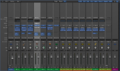
Logic Pro X Mixer

Mixing Tutorials
- Logic Pro Mixing Part 1 - Channel Strip Types and Controls
- Logic Pro Mixing Part 2 - Mixer Groups Through Panning
- Logic Pro Mixing Part 3 - Using Effects Through I/O Labels
- Mixing Cheat Sheet
- Logic Pro Mixing, Metering, And Loudness Explained
Mixing Chapter Sections
- Channel Strip Types
- Channel Strip Controls
- Mixer Groups
- Muting Channels
- Soloing Channels
- Adjusting Levels
- Choosing Pan Positions
- Using Effects
- Routing Audio with Insert Effects
- Routing Audio with Send Effects
- Controlling Signal Flow
- Using Aux Channels
- Applying Send Effects to Submixes
- Output Channel Strips
- Surround Panning
- Binaural Panning
- MIDI Channel Strips
- Saving MIDI Channel Strip Settings
- Mixer Views
- Mixer Track Notes
- I/O Labels

